
Anyone who’s tried to plan a group trip in a shared Google Doc knows what goes wrong by day three: the spreadsheet has six tabs, two cousins have added the same restaurant to different days, and the document is no longer organized so much as held together. The good itinerary apps fix this by being collaborative without being chaotic — they let everyone contribute without anyone needing to be the designated keeper of the master plan.
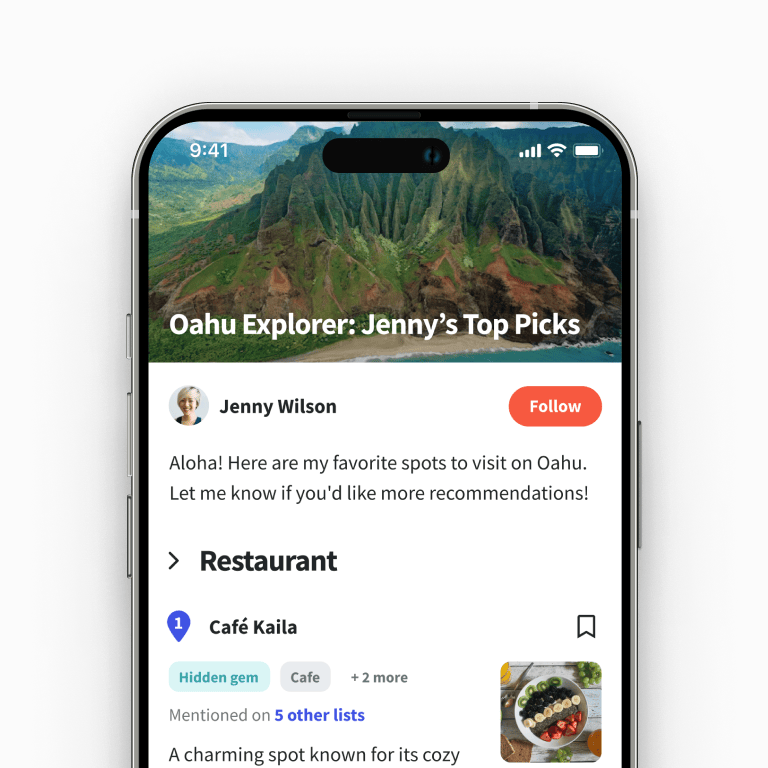
Wanderlog is the strongest answer in this category right now. Built by two brothers fresh out of a Y Combinator cohort in 2019, it’s grown to over 1.5 million monthly users and now processes around 10 million trips a year. This Locals Insider review covers what Wanderlog actually does, how the free tier compares to the $39.99/year Pro plan, current ratings, and whether the alternatives are worth a look.
What is Wanderlog?
Wanderlog was launched in San Francisco in 2019 by twin brothers Peter and Harry Xu, both with engineering backgrounds at Google and Stripe.

The company was part of Y Combinator’s Winter 2019 cohort and has since raised $1.5 million in seed funding from General Catalyst and Abstract Ventures. The legal entity behind the app is Travelchime Inc., but Wanderlog is the only product the company is currently building.
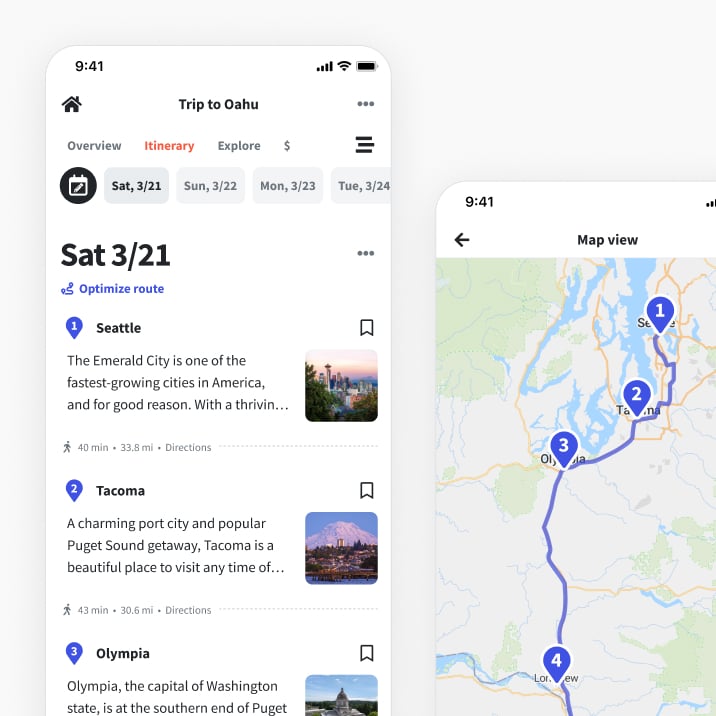
The premise is straightforward: make planning a trip — for business or pleasure, solo or with a group — feel as easy as editing a Google Doc. You can import all your reservations (flights, hotels, car rentals) so they’re accessible in one place, build a day-by-day itinerary with drag-and-drop, and invite collaborators who can edit in real time.
The app maps everything you’ve added, calculates travel time between activities, and offers AI-powered recommendations alongside human-written guides for hundreds of cities.
How to Plan Your Travel With Wanderlog?

If you’re new to Wanderlog, here’s the basic workflow:
- Create your trip by entering your destination and dates.
- Import reservations that you’ve already booked — flights, hotels, car rentals. You can forward booking confirmations from your email and Wanderlog parses them automatically.
- Build your places-to-visit list. Search nearby points of interest within the app; the ones you select appear as pins on your trip map.
- Organize activities into a daily itinerary using drag-and-drop. Wanderlog automatically suggests how to optimize travel time between stops.
- Invite friends, family, or colleagues by email. They can edit the itinerary in real time, and you can split costs through the budget section.
The collaboration is genuinely real-time — multiple people editing simultaneously, changes appearing as they happen. The map view is the underrated feature most users mention: seeing your full trip plotted geographically (rather than as a list) often reveals when you’ve over-scheduled a day, scattered restaurants in unwalkable patterns, or missed a logical clustering.
Is Wanderlog Free to Use?
Wanderlog runs a freemium model. The free tier is generous and covers most of what casual planners need:
- Unlimited places added to your trip
- Real-time collaboration with friends
- Reservation imports
- Map integration and route optimization
- AI-powered activity recommendations
- Community-written city guides
Wanderlog Pro costs $39.99/year (no monthly option for most users) and unlocks:
- Offline access to your itinerary — useful internationally or in low-signal areas
- Member-only flight and car rental deals
- Unlimited PDF and image attachments (so you can save tickets, vouchers, screenshots inside the trip)
- Export to Google Maps and Waze for navigation
- Dark mode
- Unlimited AI assistance in real time
- Ad-free experience
At $39.99/year, Pro works out to roughly $3.33 per month — fair value if you travel often and rely on offline access or PDF export. For occasional travelers, the free tier covers nearly everything that matters.
Wanderlog Bonuses, Promo Codes & Offers
Wanderlog doesn’t run consumer discount codes year-round, but a few legitimate routes to discounted or free Pro access are worth knowing about:
- Dream Trip Contest: Wanderlog periodically runs a contest offering all entrants 3 months of free Wanderlog Pro access, plus the chance to win a $1,000 travel prize. Entry requires submitting a travel itinerary built on the platform — useful if you’re already in planning mode for a real trip. Effectively reduces the annual Pro cost from $39.99 to roughly $30 if you continue after the free period.
- Pro flight and car rental deals: Pro subscribers get access to member-only discounted rates on flights and rental cars through Wanderlog’s booking partners. The savings vary widely by route and provider, but for a single international flight or week-long rental, the discount can easily exceed the $39.99 annual subscription cost.
- Annual-only pricing as a discount: Pro is primarily sold as an annual plan rather than monthly — meaning the standard rate of $39.99/year is already significantly cheaper than the equivalent monthly option (which historically ran around $17/month, or $204 annualized).
There’s no permanent free trial of Pro outside the Dream Trip Contest, but the free tier is functional enough that most users can decide whether the upgrade is worth it after a real planning session or two on the free plan.

Wanderlog Ratings & Reviews: Is It Worth Using?
Users genuinely like this app, and the ratings show it:
- App Store: 4.9/5.0 (32,000+ reviews)
- Google Play: 4.5/5.0 (32,400+ reviews)
Reviewers consistently praise the clean interface, the smooth collaboration, and the in-app recommendations — that last point is where Wanderlog separates itself from competitors like Tripit, which focus more narrowly on organization. Wanderlog actively suggests restaurants, activities, and nearby points of interest based on where you’re staying, often pulling from Google and Yelp data.
The strongest criticisms are around feature gaps rather than execution failures. Some users want stronger budgeting tools (the expense splitting is functional but basic), more comprehensive trip notifications, and AI itinerary generation (Wanderlog’s AI suggests activities but doesn’t auto-generate full itineraries the way newer competitors do). The Pro subscription cost also draws some pushback — particularly from users who feel offline access should be a free feature.
One Google Play reviewer, Ruth Foo, wrote: “I found Wanderlog by chance as I was looking to prepare an itinerary for our holiday, so I could easily see our plans for each day, as we were moving from hotel to hotel for a fortnight. Wanderlog gave me this and so much more. It was great to see local suggestions near to each hotel, being able to quickly find hotels to add, and the option of adding flight details.”
Insider tip: Before inviting collaborators, build a rough first-draft itinerary yourself. Empty trip documents intimidate group members into doing nothing; a half-finished one invites them to edit, suggest, and refine. Even just adding flights, hotels, and two or three activities per day is enough to break the staring-at-a-blank-page paralysis.
Wanderlog Alternatives: Try Tripit
The most established alternative is Tripit, which has been around since 2006 and remains the gold standard for travel document organization. The key difference: Tripit is built for organizing what’s already booked, while Wanderlog is built for planning what hasn’t been decided yet.
Forward your booking confirmations to plans@tripit.com and Tripit automatically builds a master itinerary. The free tier covers basic itinerary creation and document storage. Tripit Pro runs $49/year and adds real-time flight alerts, alternate flight suggestions when yours is canceled, seat tracker, terminal maps and walking directions inside airports, loyalty point tracking across 150+ programs, and refund opportunity alerts — features that are genuinely valuable for frequent flyers.
Bottom line: Choose Wanderlog if you want an all-in collaborative planner that helps you discover, organize, and map your trip together with others. Choose Tripit if you book everything yourself, travel often for work, and want flight-day intelligence over trip-planning collaboration.
For broader travel toolkit coverage, our guides to the best AI travel planners and Google Maps alternatives for navigation cover the apps and routing tools that pair well with Wanderlog on a real trip.
We have also explained how coliving apps work, where you rent and share an apartment with strangers who travel to the same city as you.