



The translation app market is in the middle of a quiet revolution. Apple’s Live Translation on AirPods Pro 3, AirPods Pro 2, and AirPods 4 with ANC expanded to the EU with iOS 26.2 in November 2025, letting two people each wearing AirPods carry on a conversation in different languages with near-real-time translation overlaid through the earbuds. Google countered with a Translate app update that brings Live Translate to any pair of headphones — not just Pixel Buds — supporting 70+ languages, with iOS rollout planned for 2026.
The standalone translation app, in other words, is no longer the only way to do this. Which raises a sensible question: in 2026, is iTranslate still worth downloading? This Locals Insider review covers what the app does well, what it costs now, how it stacks up against Google Translate, and whether the AirPods alternative makes it redundant.
Introducing iTranslate
iTranslate launched in October 2008, created by Austrian developer Alexander Marktl in Graz. It started as a simple text-to-text translation app and gradually expanded to include voice, camera, offline mode, and keyboard extensions. For more than a decade it was one of the most-downloaded translation apps in the world — over 150 million combined downloads across iOS and Android, with 71 million on Google Play alone.
The ownership has shifted considerably over the years. iTranslate was previously owned by Mosaic Group, IAC’s mobile app division. In January 2024, Italian app developer Bending Spoons (based in Milan, also the company behind Evernote, Remini, and Splice) acquired all of Mosaic Group’s digital assets — including iTranslate — from IAC in a deal valued at over $100 million. iTranslate is now part of the Bending Spoons portfolio, which currently serves more than 100 million users each month across its product suite. The current privacy policy and developer pages on the App Store and Google Play confirm Bending Spoons as the operating company.
How iTranslate Works
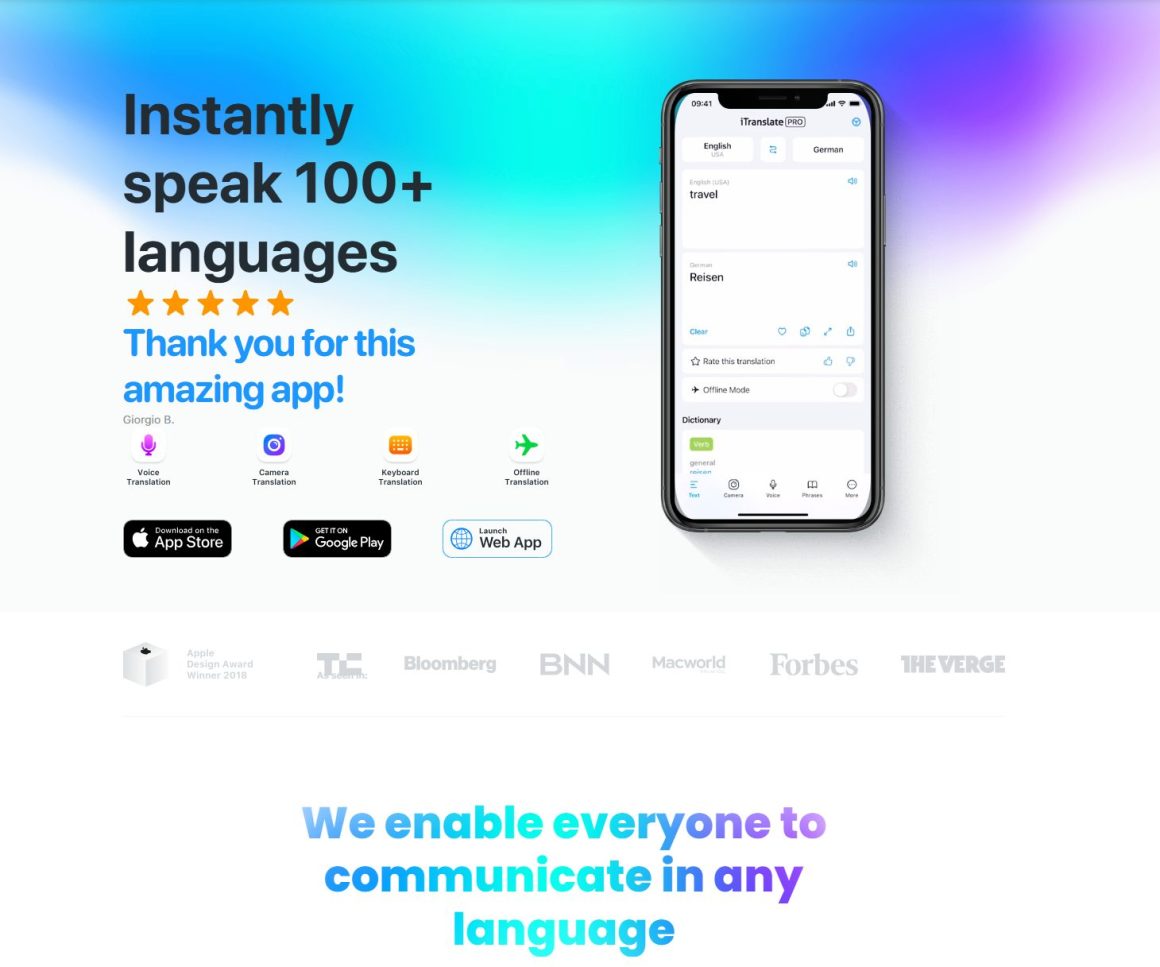
iTranslate is an app-based translator supporting 100+ languages, including major ones (English, Spanish, French, German, Arabic, Mandarin, Japanese, Korean) and a long tail of less commonly served languages (Filipino, Hebrew, Hindi, Vietnamese, Bengali, Chichewa, Basque). The translation methods include:
- Text-to-text translation: Type or paste a phrase and get an instant translation. Includes autocomplete and a phrasebook with hundreds of pre-translated common phrases.
- Voice-to-voice translation: Speak into the app in one language, hear it played back in another. We used it at a bar in Kyoto to speak with two Japanese guys about everything, who did not speak much English, and we did not know much Japanese.
- Camera translation (Pro): Point your phone at printed text — menus, signs, documents — and see an instant translation overlaid on the image.
- Offline translation (Pro): Download language packs for use without an internet connection (genuinely useful when traveling without roaming or in patchy coverage).
- Keyboard translation extension: Add the iTranslate keyboard to your phone and translate on the fly in any messaging app.
- Smartwatch integration: Receive translations on your wrist via Apple Watch or Wear OS.
- Verb conjugation and dictionary tools: Look up word definitions and verb forms across supported languages.
The thumbs-up/thumbs-down rating below each translation feeds back to the developers for accuracy improvement — small but useful detail that’s helped iTranslate refine its less-common language pairs over time.
How to Use iTranslate
Here’s the practical flow with a real-world scenario. You’re trying to find a small ramen shop in Shinjuku, your map shows the alley but not the entrance, and the elderly gentleman sweeping the sidewalk doesn’t speak English. The classic traveler’s moment.
- Open iTranslate and set your language pair. Tap the language buttons at the top — English on the left, Japanese on the right (or whatever direction you need). Swap them by tapping the arrow icon between them.
- Tap the microphone button. The app starts listening immediately. Speak naturally: “Excuse me, where is Ichiran ramen?” Speak clearly but don’t over-enunciate — modern speech recognition handles normal speed fine.
- Wait 1-2 seconds for the translation. iTranslate displays the Japanese text and plays the audio out loud through your phone speaker. Hold the phone toward the person so they can hear.
- Let them respond. Tap the microphone again with the language direction reversed (Japanese → English) and have them speak. The app translates their answer back.
- Save useful phrases to your phrasebook. “Where is the bathroom,” “How much is this,” “Can you help me” — phrases you’ll use repeatedly. Saved phrases are accessible offline if you’ve downloaded the language pack.
Total time per exchange: about 10-15 seconds each direction. Works the same way at a pharmacy in Marrakech, a train station in Warsaw, or a guesthouse check-in in Hanoi — anywhere you need to actually have a back-and-forth conversation rather than just read a sign.
Pricing & Plans: Is iTranslate Free?
iTranslate is a freemium app. The free tier offers basic text-to-text translation in 100+ languages, plus the phrasebook. Most premium features — voice-to-voice, camera translation, offline mode, website translation, and ad removal — require iTranslate Pro.
Current 2026 pricing (verified March 2026):
- Monthly subscription: $5.99/month (some regions/legacy plans still see $9.99/month)
- Annual subscription: $39.99/year on the standard tier, up to $99.99/year on premium tiers depending on features and region
- 7-day free trial: Available for new users when you upgrade through the app
Important note on billing: iTranslate’s subscription practices have generated a meaningful number of complaints on the App Store and Google Play, particularly around the 7-day free trial auto-renewing into a full annual subscription if not cancelled in time. The fix is simple but easy to forget: set a calendar reminder for day 6 of the trial, and either cancel via your Apple ID/Google Play subscription settings or commit to the paid plan deliberately.
For travelers, the Pro tier is a “buy it for the trip” purchase. Subscribe before you leave, use the camera and voice features intensively for the duration, and cancel before billing renews. For students or professionals using translation regularly, the annual plan is the better value.
iTranslate Ratings & Reviews: Is It Good?
The ratings tell two very different stories depending on the platform:
- App Store: 4.7/5.0 (523,000+ reviews)
- Google Play: 3.35/5.0 (380,000+ reviews)
The gap is significant and worth examining honestly. iTranslate has always been an iOS-first app, with the iPhone interface and user experience getting more development attention than the Android version. The Google Play reviews skew negative for several reasons: more frequent crashes on Android, more aggressive subscription paywalls perceived as locking essential features (camera translation, voice mode), and a wave of complaints about auto-renewing trials. None of these are unique to iTranslate — most subscription apps face the same criticism — but the volume of negative Android reviews is genuinely high.
The positive reviews on both platforms consistently praise the translation accuracy (especially for European languages), the offline mode for travel, and the convenience of the keyboard extension for cross-language messaging.
One App Store reviewer, Rolling_adventures, wrote: “I love iTranslate and use it frequently. My sister-in-law is Italian, and I am American. She speaks and writes in English without issue, but most of her family and friends back home don’t speak English and are more comfortable in Italian. iTranslate helps me understand Facebook comments about my sister-in-law and niece that I would otherwise be unable to read.”
Insider tip: Download offline language packs for your destination before you fly. The download is free on Pro and takes 50-200 MB per language depending on size. Once downloaded, you can translate without a cellular connection — genuinely useful in airports with broken Wi-Fi, on trains crossing borders, or in remote areas where roaming is unreliable. Don’t wait until you’re standing at the customs counter to discover you needed the Spanish pack.
iTranslate Lingo: The Sibling Language-Learning App
Worth knowing if you’re already in the iTranslate ecosystem: the company also offers iTranslate Lingo, a separate vocabulary-learning app available on iOS. It teaches you new words in small daily doses — 4 words per lesson, around 5 minutes per day, with a target of around 1,000 words in 8 months — across 14 languages (English, Spanish, French, German, Italian, Portuguese, Dutch, Swedish, Turkish, Russian, Japanese, Korean, Mandarin Simplified, and Mandarin Traditional). Each language has 3 skill levels and 30+ themed categories (travel, food, business, family, and so on), with audio training, multiple-choice quizzes, typing exercises that auto-correct your spelling, and a “Match” game mode that rewards correct word pairings with bonus time.
Lingo is positioned as a lighter, less time-intensive alternative to Duolingo or Babbel — focused specifically on building vocabulary rather than full grammar or conversation skills. Verb conjugation, gendered articles (a noted gap, particularly for German learners), and sentence construction aren’t really its strength. But for travelers who just want to know more useful words in their destination’s language before a trip, it’s a reasonable companion to the main iTranslate app.
The app is free to download with optional in-app purchases. The most useful detail: if you already subscribe to iTranslate Pro, your subscription unlocks the full Lingo experience as well — the two apps share one Pro membership across the iTranslate App Suite. That makes Lingo essentially a free bonus for existing Pro users, which is the most honest reason to try it.
Alternatives to iTranslate: Google Translate, Apple Live Translation
The two strongest alternatives are now genuine competitors rather than fallback options.
Google Translate is the obvious one. It’s completely free, supports 249 languages as of March 2026 (versus iTranslate’s 100+), and matches iTranslate feature-for-feature on the basics: text, voice, camera, conversation mode, offline packs, handwriting input, and document/webpage translation from the desktop version. It also recently added the ability to translate live conversations through any pair of headphones via the Translate Android app — not just Pixel Buds — supporting 70+ languages, with iOS rollout coming in 2026. For most travelers, Google Translate is the more practical free option.
Apple Live Translation is the hardware-integrated alternative. If you have AirPods Pro 3, AirPods Pro 2, or AirPods 4 with ANC and an iPhone running iOS 26.2 or later, you can long-press both earbud stems to activate hands-free real-time translation. Apple’s version is currently in beta but works surprisingly well for in-person conversations across supported languages. Limitations: it requires newer AirPods, supports fewer languages than iTranslate or Google Translate, and the translation is currently English-paired only (i.e., English to/from other languages, not arbitrary pairs).
Bottom line: iTranslate still wins on three specific use cases — its phrasebook for common travel scenarios, its keyboard extension for messaging apps, and its long-standing reputation for accuracy in less common languages. For everything else, Google Translate is free and supports more than twice as many languages, while AirPods Live Translation handles in-person conversations more elegantly than any phone app.
For broader travel context, our roundup of the best AI travel planning tools and apps for 2026 covers the AI assistants that pair well with a translation app, and our guide to Taiwan — where to go and what to see is a good test case for any translation app since most Taiwanese restaurants and street vendors operate primarily in Mandarin and Taiwanese Hokkien.
iTranslate Promotions & Free Offers
iTranslate runs frequent promotional pricing rather than fixed discounts. A few practical routes to lower-cost or free access:
- 7-day free trial — available to all new Pro subscribers. Use it for an entire short trip (a long weekend in Lisbon, a week in Tokyo) and cancel before renewal. The trial unlocks every Pro feature, including voice and camera translation.
- Single-month subscription for one trip — at $5.99 (current monthly rate), Pro for a single month covers an entire two-week trip with full premium features. Set a reminder to cancel before the next billing cycle.
- Annual plan savings — at $39.99/year versus $5.99/month ($71.88/year), the annual plan saves roughly 44% if you’ll use translation regularly. Worth it for frequent travelers or people regularly messaging across language barriers.
- Regional pricing — iTranslate Pro pricing varies meaningfully by region. App Store and Google Play list local pricing that’s sometimes 30-40% lower than US rates. Check the listing from a VPN if you’re curious whether your region has cheaper pricing than another.
- Free tier is genuinely usable for basics — if all you need is text-to-text translation in major languages, the free version of iTranslate (and the entire Google Translate app) covers it. The Pro tier earns its keep only if you specifically value voice, camera, or offline functionality.
The honest comparison: at $5.99/month, iTranslate Pro is reasonable. At $39.99/year, it’s good value if you use translation regularly. Against free Google Translate and free Apple Live Translation through your existing AirPods, it’s a closer call than it used to be.
And, you can always use ChatGPT to translate anything as well, it is almost free.